Cron (Schedule)
Scheduled task management section in the Platon Platform
Cron (Schedule)
The purpose of Cron (Schedule) in the Platon platform is to execute a given query at a specific time interval. This configured Navigation panel (or Menu list) can be customized according to user requirements.
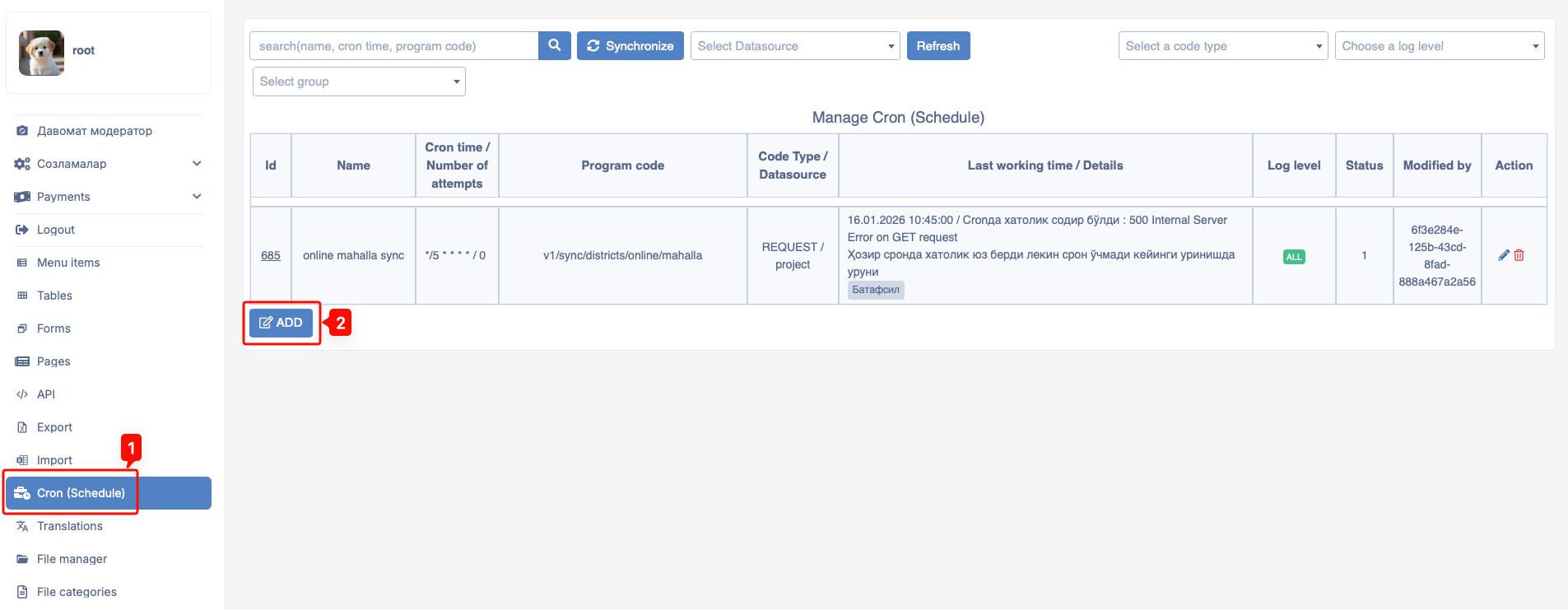
To use the Cron (Schedule) feature, navigate to the Cron (Schedule) section in the Platon platform's navigation list.
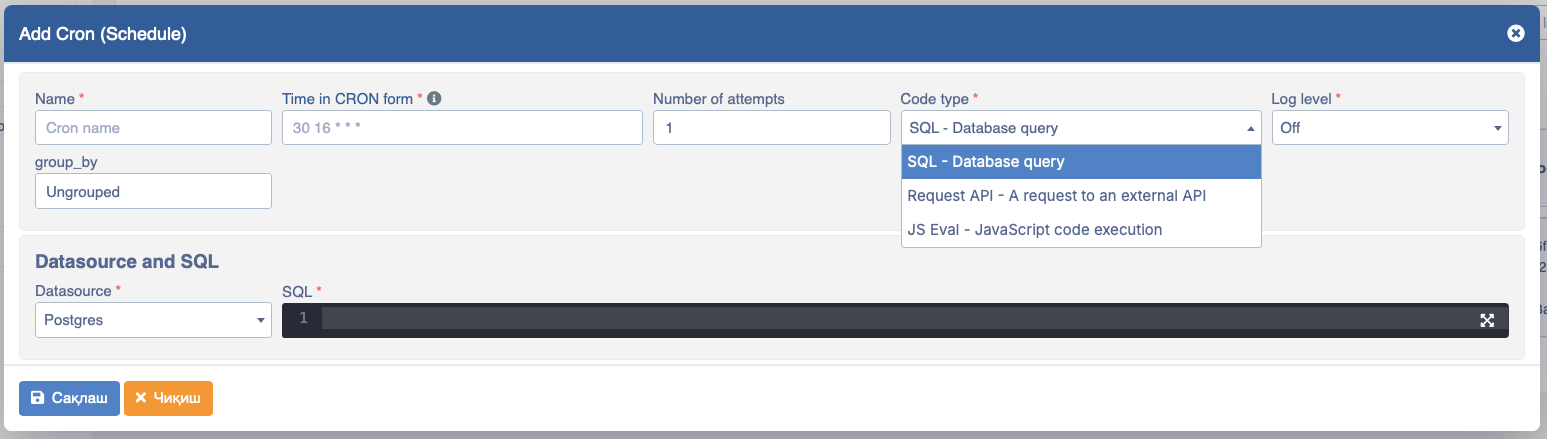
- Name - The Cron name must be unique.
- Time in CRON format - The Cron's repeat cycle (how often it runs).
- Number of attempts - If the number of attempts is 0, it will run continuously.
- Code type - There are 3 types of Cron code:
- SQL
- Request API
- JS Eval
- Log level - Whether logging is enabled and the scope level of logs
- group_by - Grouping Crons
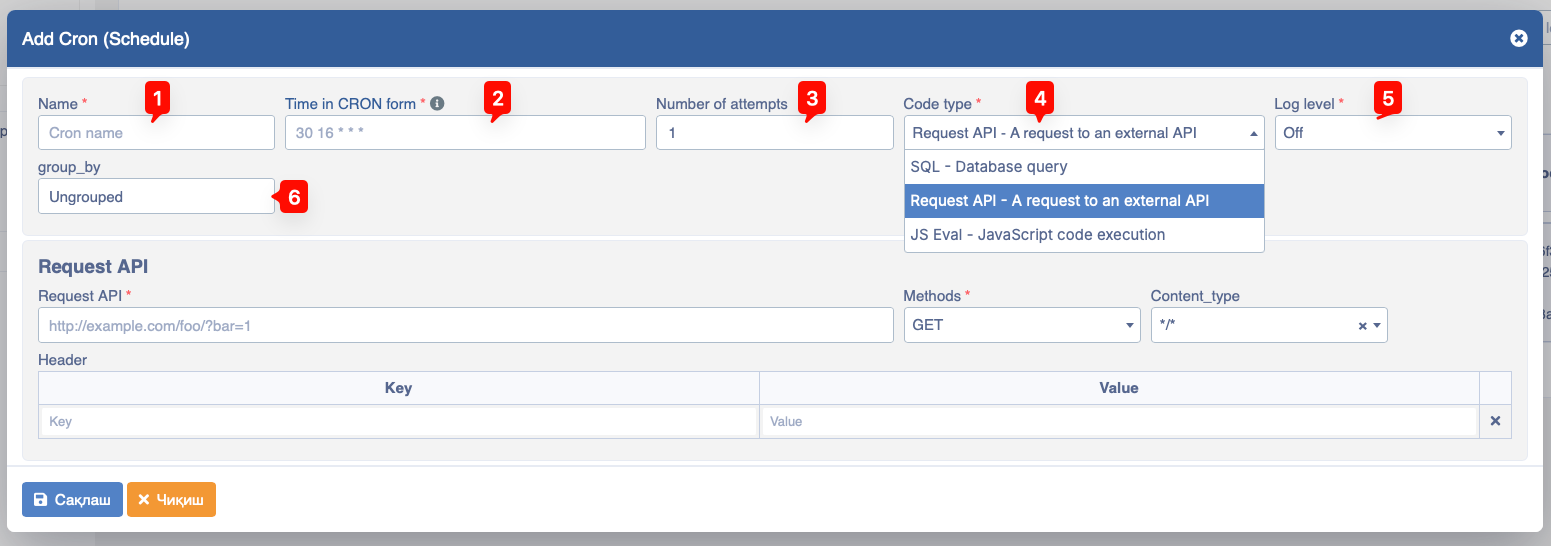
- Request API - Specify which API to call
- Methods - API types:
GET,PUT,DELETE,POST - Content_type - Content type in the API (usually
application/jsonformat is most commonly used). - Header - Keys and values, typically used for Authorization and data that needs to be sent in the request Header.
- Key - Key for the Header (for example,
Authorization) - Value - Value for the Header (for example,
JWT token value)
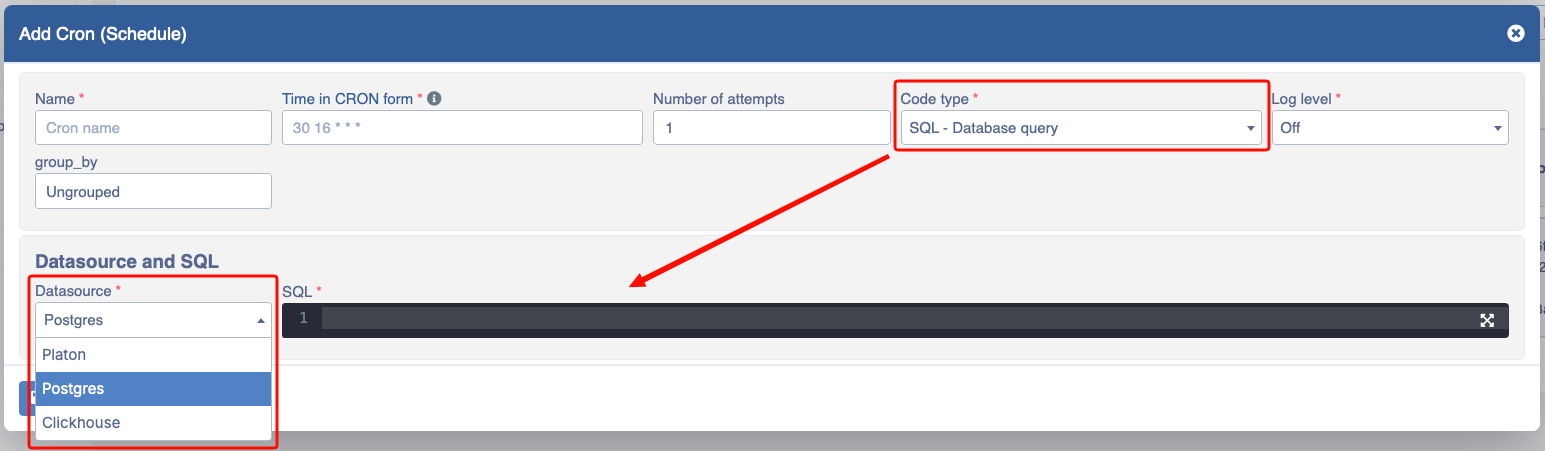
- Datasource - Which type of database to work with (
PostgresorClickhouse) - SQL - Structured queries
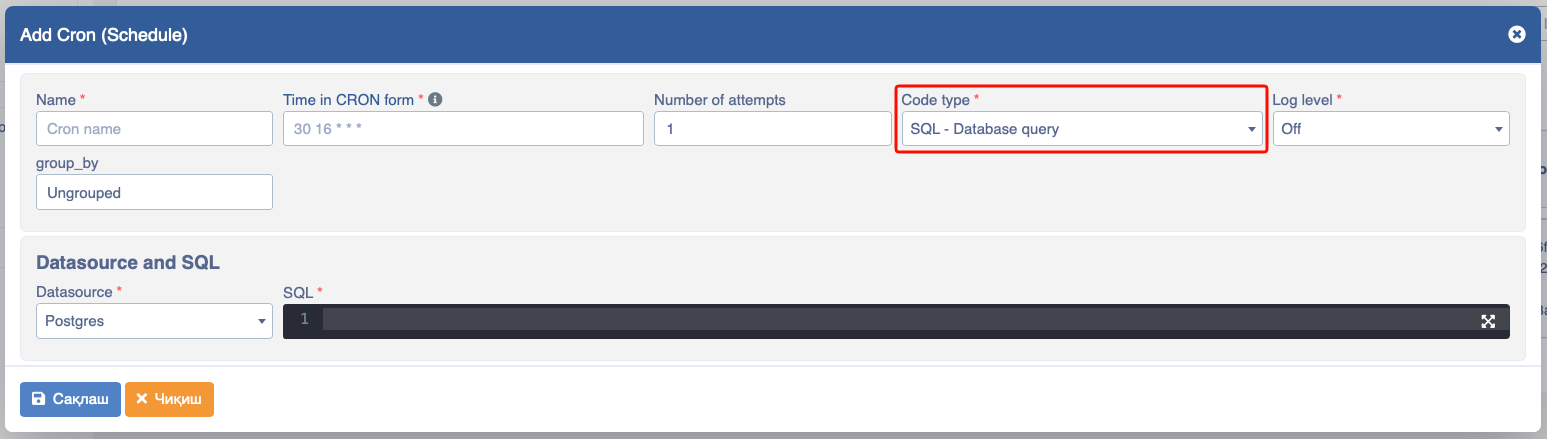
If the Cron needs to be executed via SQL, select SQL - Database Query from the Code type section and fill in the required fields.
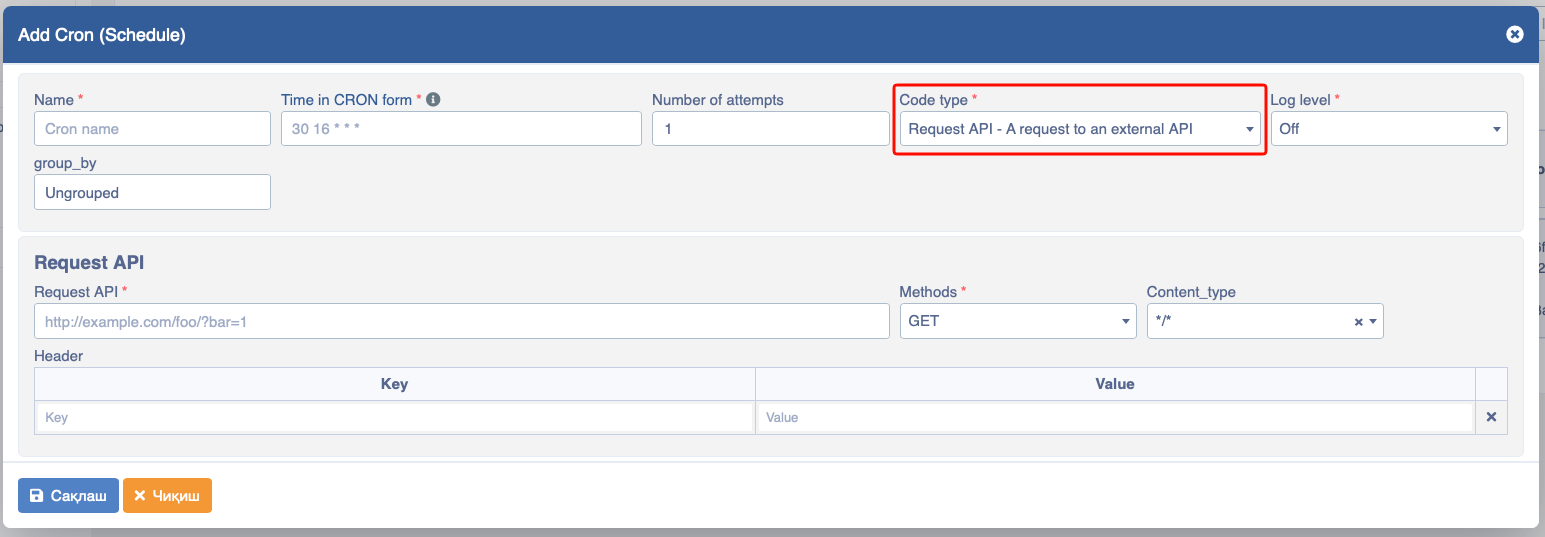
If the Cron needs to be executed via API, select Request API - External API Request from the code type section and fill in the required fields.
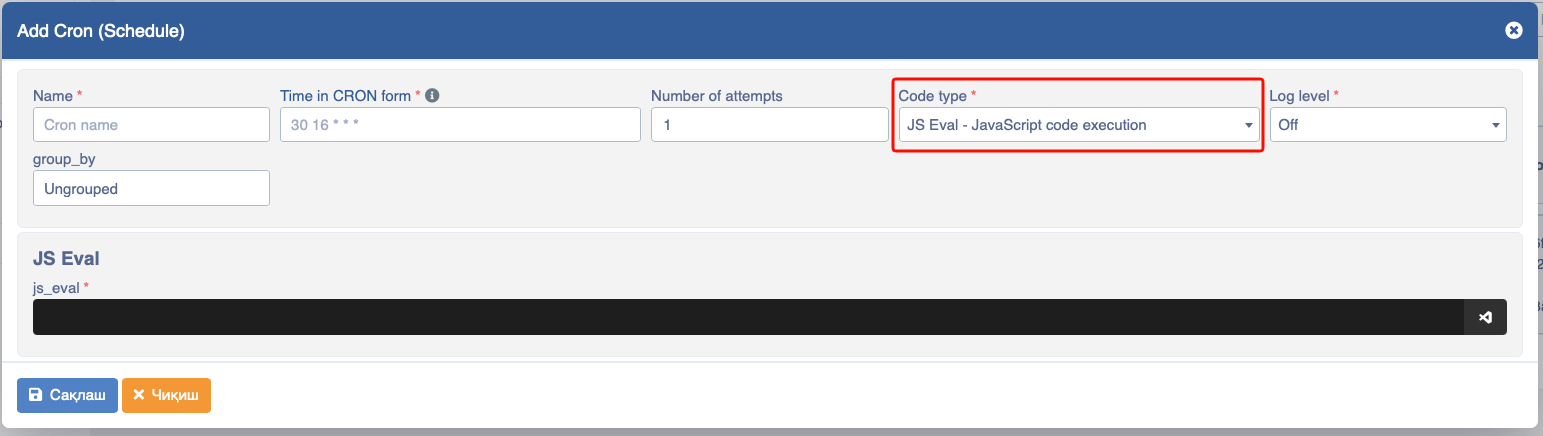
If the Cron needs to be executed via JS Eval, select JS Eval - Execute JavaScript code from the code type section and fill in the required fields.
Main data consists of the following fields:
- Name (first field) - you name the cron;
- Time in CRON format (second field) - execute the code you wrote at the time you specified;
// for example
* * * * *            // every minute
*/30 * * * *         // every 30 minutes
30 16 * * *          // every day at 16:30
30 16 2 * *          // on the 2nd of every month at 16:30
30 16 2 11 *         // on November 2nd every year at 16:30
30 16 * 11 Mon-Fri // every weekday in November at 16:30- Number of attempts (third field) - if an error occurs and it doesn't work, retry
ntimes;
// for example
0 // if selected, even if an error occurs in the cron, it won't stop and will continue execution
3 // tries 3 times
5 // tries 5 times- Code type (fourth field):
- SQL - execute a database-related query.
- Request - send a request to external and Platon URLs.
- JS Eval - execute JavaScript code.
Additional Information
Regarding the Cron (Schedule) function, how to distinguish the asterisks placed in each code.
A field can be an asterisk (*), which always means "first-last". For the "day of month" or "day of week" fields, a question mark (?) can be used instead of an asterisk.
Number ranges are expressed with two numbers separated by a dash (-). The specified range is inclusive.
/n after a range or (*) specifies the interval step through the range of number values.
English names can also be used for the "month" and "day of week" fields. Use the first three letters of a specific day or month (case insensitive).
The "day of month" and "day of week" fields can have the letter L meaning "last", and it has different meanings in each field.
In the "day of month" field, L means "last day of the month". If there's a negative offset (i.e., L-n), it means "nth day from the end of the month". If followed by W (i.e., LW), it means "last working day of the month".
In the "day of week" field, L means "last day of the week". If prefixed with a number or three-letter name (i.e., dL or DDDL), it means "last d (or DDD) day of the month".
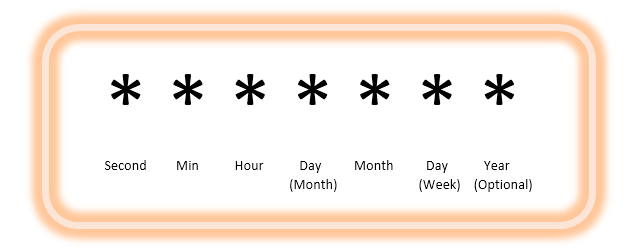
What each asterisk means in Cron (Schedule):
- first asterisk means second;
- second asterisk means minute;
- third asterisk means hour;
- fourth asterisk means day;
- fifth asterisk means month;
- sixth asterisk means week;
- seventh asterisk means year;
- "0 0 * * * *" = at the top of every hour of every day.
- "*/10 * * * * *" = every ten seconds.
- "0 0 8-10 * * *" = at hours 8, 9 and 10 every day.
- "0 0 6,19 * * *" = at 6:00 AM and 7:00 PM every day.
- "0 0/30 8-10 * * *" = at 8:00, 8:30, 9:00, 9:30, 10:00 and 10:30 every day.
- "0 0 9-17 * * MON-FRI" = nine to five on weekdays
- "0 0 0 25 12 ?" = at midnight every Christmas
For more complete information, you can visit the crontab page.