JSEval
In the latest update, we've added a new editor to help you develop, maintain, and test your own code. The editor is based on MonacoEditor from Microsoft's progressive editor, actively used in VS Code, and allows you to use all the functionalities and tools supported in this editor. Additionally, the new development environment includes support for ES6/7/8 (https://www.codingame.com/playgrounds/3629/5-features-of-es-6-7-8-that-supercharge-your-javascript) version syntax, and a convenient console for code testing and debugging.
The base element of the form is divided into two parts:
Code view – this block displays part of your code written in the editor Active button to call the editor

Main element of the form
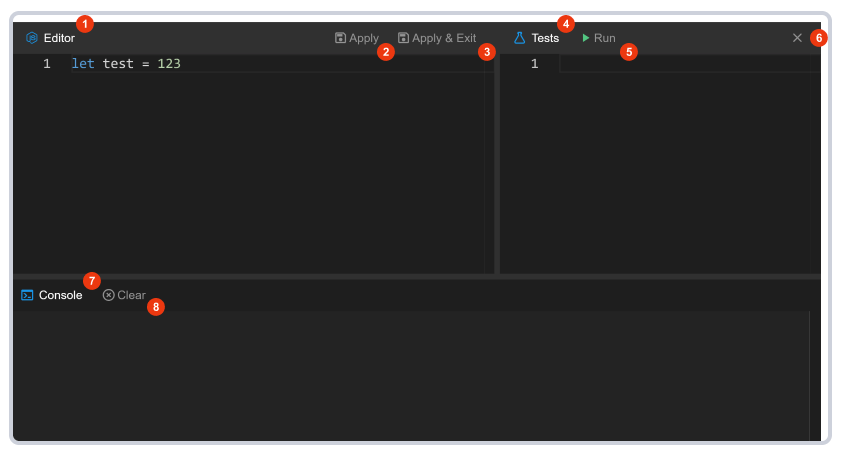
The editor interface itself consists of a workspace divided into 3 panels. The upper left panel (1) contains the code editor, to its right is the test editor (4), and at the bottom of the window is the console (7).
Editor interface
- Code editor - supports the basic functionality of VS Code.
- Save
[Ctrl+S]- saves data from the editor to the form. - Save and exit - saves data from the editor to the form and closes the development environment.
- Test editor – window for writing tests for code.
- Run tests
[Alt+Enter]– runs tests and outputs their results to the console. - Exit
[Esc]– closes the working window. - Console - window for displaying service messages about errors, Console interface logs (log, warning, error) and test execution results.
- Clear console
[Ctrl+L]- clears data in the console.
Variables
- requestParams
- userParams
- variables.{stageName}
JSON
One of the most important features available in JS Eval is working with sources from API requests through JSON methods. For example, converting "string" data from an API request to a JavaScript object, or converting "object" data from an API request to "string" format.
parse(): This receives JSON data from the server as a parameter and returns a JavaScript object.
const txt = '{"name":"John", "age":30, "city":"New York"}'
const obj = JSON.parse(txt);

// and we get the "obj" variable in this form:

// obj = {
//    age: 30,
//    city: "New York",
//    name: "John"
// }stringify(): This takes an "object" as a parameter and returns the equivalent JSON string ready to send to the server.
const obj = {
    age: 35,
    city: "New Orlean",
    name: "Samwell"
}
const str = JSON.stringify(obj);

// and we get the "str" variable in JSON format ready to send to the server in this form:

// {"name":"John","age":30,"city":"New York"}
CONSOLE
In JS Eval, we've integrated the most basic and commonly used console methods. The JS Eval console can be used to monitor code execution, view results, and detect errors.
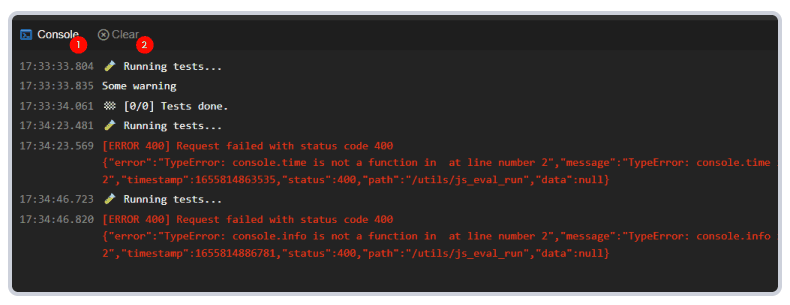
As shown in the image, the console is located at the bottom of the JS Eval editor and consists of 2 buttons:
- Button to switch to "Console" - 1
- Button to clear "Console" - 2
Let's get acquainted with the available console methods one by one:
console.log()- receives a message and outputs the result to the console. It can also output JavaScript objects, arrays - all data types in JavaScript. Additionally, it formats the displayed messages in an understandable way.
console.log("Hello World"); // String
console.log({name: "Sam Simon", age: 43,}); // Object
console.log(["Apple", "Banana", "Orange"]); // Array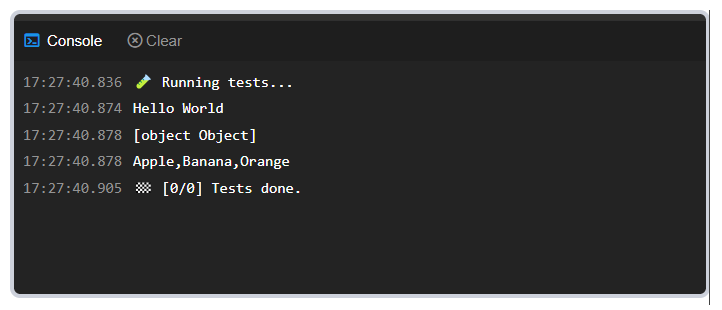
console.error()- we've seen thatconsole.log()is a command that outputs all data, so it can be said thatconsole.error()is very similar toconsole.log()and only outputs errors.
console.error("Something is wrong");
console.error("Output error with your own custom message");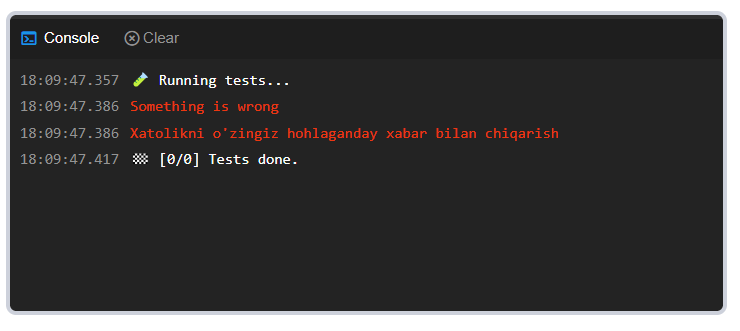
console.warn()- this console command is also similar toconsole.log()and is often used to output reminders and recommendations. Additionally, thewarn()command is used to mark code that is written incorrectly but without errors.
console.warn("Some warning");
console.warn("You can output your own warning messages in this section");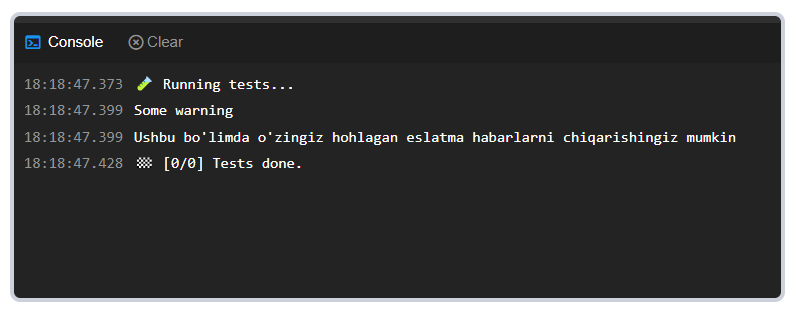
THROWS
The JSEval function is needed to throw expected errors via http status. For example, you can validate values coming from requestParam through JsEval.
const _name = requestParams.name;  // required  type: varchar
const category_id = requestParams.category_id;  // required  type: bigint
const main_photo = requestParams.main_photo;   // required  type: varchar
const description = requestParams.description;  // required  type: varchar

if (!_name) throws.responseException('BAD_REQUEST', 'name is required')
if (typeof _name != 'string') throws.responseException('BAD_REQUEST', 'name must be string')
if (_name.length > 255) throws.responseException('PAYLOAD_TOO_LARGE', 'name limit is 255')

if (!category_id) throws.responseException('BAD_REQUEST', 'category_id is required')
if (typeof category_id != 'number') throws.responseException('BAD_REQUEST', 'category_id must be number')
if (category_id < 0) throws.responseException('PAYLOAD_TOO_LARGE', 'category_id must be positive number')


if (!main_photo) throws.responseException('BAD_REQUEST', 'main_photo is required')
if (typeof main_photo != 'string') throws.responseException('BAD_REQUEST', 'main_photo must be string')
if (main_photo.length > 255) throws.responseException('PAYLOAD_TOO_LARGE', 'main_photo limit is 255')

if (typeof description != 'string') throws.responseException('BAD_REQUEST', 'description must be string')
if (description.length > 255) throws.responseException('PAYLOAD_TOO_LARGE', 'description limit is 255')throws.responseException(HTTP STATUS,THROWS MESSAGE)- HTTP STATUS- http statuses
- THROWS MESSAGE - any text we want to return.
HTTP STATUSES
CONTINUE(100, "Continue"),
    // Code indicating that all requests are in place and can continue

SWITCHING_PROTOCOLS(101, "Switching Protocols"),
    // This code is sent to an existing request with the Upgrade: header and indicates that the server has switched to the protocol specified in the header.

PROCESSING(102, "Processing"),
    // "Work in progress". This code indicates that the server has received the request and work on it has not yet been completed.

CHECKPOINT(103, "Checkpoint"),
    //

OK(200, "OK"),
    // "Successful". Request executed successfully.

CREATED(201, "Created"),
    // "Created". Request executed successfully and a resource was created as a result. This code is usually sent in response to a PUT request.

ACCEPTED(202, "Accepted"),
    // "Accepted". The request has been accepted but not yet processed.

NON_AUTHORITATIVE_INFORMATION(203, "Non-Authoritative Information"),
    // "Information is not reliable." This code indicates that the returned data was obtained not from the original server but from another source.

NO_CONTENT(204, "No Content"),
    // "No content." There is no content responding to the request, but response headers that may be useful are sent.

RESET_CONTENT(205, "Reset Content"),
    // "Reset content". This code is sent to indicate that the view of the document from which the request was sent should be reset.

PARTIAL_CONTENT(206, "Partial Content"),
    // "Partial structure". This code is used in requests intended for downloading in multiple parts.

MULTI_STATUS(207, "Multi-Status"),
    // This code provides status of multiple independent processes

ALREADY_REPORTED(208, "Already Reported"),
    //

IM_USED(226, "IM Used"),
    //

MULTIPLE_CHOICES(300, "Multiple Choices"),
    // "Multiple choices". This code is sent when there are multiple responses to a request. And the user-agent or user should choose one of the responses.

MOVED_PERMANENTLY(301, "Moved Permanently"),
    // "Moved permanently". This code indicates that the "URI" of the requested resource has been changed.

FOUND(302, "Found"),
    // "Found". This code indicates that the requested resource has been found and temporarily changed.

MOVED_TEMPORARILY(302, "Moved Temporarily"),
    //

SEE_OTHER(303, "See Other"),
    // "See other resources". This code is sent to redirect the client to get data from another URI with a GET request.

NOT_MODIFIED(304, "Not Modified"),
    //

USE_PROXY(305, "Use Proxy"),
    //

TEMPORARY_REDIRECT(307, "Temporary Redirect"),
    //

PERMANENT_REDIRECT(308, "Permanent Redirect"),
    //

BAD_REQUEST(400, "Bad Request"),
    //

UNAUTHORIZED(401, "Unauthorized"),
    //

PAYMENT_REQUIRED(402, "Payment Required"),
    //

FORBIDDEN(403, "Forbidden"),
    //

NOT_FOUND(404, "Not Found"),
    //

METHOD_NOT_ALLOWED(405, "Method Not Allowed"),
    //

NOT_ACCEPTABLE(406, "Not Acceptable"),
    //

PROXY_AUTHENTICATION_REQUIRED(407, "Proxy Authentication Required"),
    //

REQUEST_TIMEOUT(408, "Request Timeout"),
    //

CONFLICT(409, "Conflict"),
    //

GONE(410, "Gone"),
    //

LENGTH_REQUIRED(411, "Length Required"),
    //

PRECONDITION_FAILED(412, "Precondition Failed"),
    //

PAYLOAD_TOO_LARGE(413, "Payload Too Large"),
    //

REQUEST_ENTITY_TOO_LARGE(413, "Request Entity Too Large"),
    //

URI_TOO_LONG(414, "URI Too Long"),
    //

REQUEST_URI_TOO_LONG(414, "Request-URI Too Long"),
    //

UNSUPPORTED_MEDIA_TYPE(415, "Unsupported Media Type"),
    //

REQUESTED_RANGE_NOT_SATISFIABLE(416, "Requested range not satisfiable"),
    //

EXPECTATION_FAILED(417, "Expectation Failed"),
    //

I_AM_A_TEAPOT(418, "I'm a teapot"),
    //

INSUFFICIENT_SPACE_ON_RESOURCE(419, "Insufficient Space On Resource"),
    //

METHOD_FAILURE(420, "Method Failure"),
    //

DESTINATION_LOCKED(421, "Destination Locked"),
    //

UNPROCESSABLE_ENTITY(422, "Unprocessable Entity"),
    //

LOCKED(423, "Locked"),
    //

FAILED_DEPENDENCY(424, "Failed Dependency"),
    //

TOO_EARLY(425, "Too Early"),
    //

UPGRADE_REQUIRED(426, "Upgrade Required"),
    //

PRECONDITION_REQUIRED(428, "Precondition Required"),
    //

TOO_MANY_REQUESTS(429, "Too Many Requests"),
    //

REQUEST_HEADER_FIELDS_TOO_LARGE(431, "Request Header Fields Too Large"),
    //

UNAVAILABLE_FOR_LEGAL_REASONS(451, "Unavailable For Legal Reasons"),
    //

INTERNAL_SERVER_ERROR(500, "Internal Server Error"),
    //

NOT_IMPLEMENTED(501, "Not Implemented"),
    //

BAD_GATEWAY(502, "Bad Gateway"),
    //

SERVICE_UNAVAILABLE(503, "Service Unavailable"),
    //

GATEWAY_TIMEOUT(504, "Gateway Timeout"),
    //

HTTP_VERSION_NOT_SUPPORTED(505, "HTTP Version not supported"),
    //

VARIANT_ALSO_NEGOTIATES(506, "Variant Also Negotiates"),
    //

INSUFFICIENT_STORAGE(507, "Insufficient Storage"),
    //

LOOP_DETECTED(508, "Loop Detected"),
    //

BANDWIDTH_LIMIT_EXCEEDED(509, "Bandwidth Limit Exceeded"),
    //

NOT_EXTENDED(510, "Not Extended"),
    //

NETWORK_AUTHENTICATION_REQUIRED(511, "Network Authentication Required");
HTTP
This function provides the ability to work with APIs inside JsEval.
Additional
The following types of API requests are available. They are accessed as follows:
- http.get(...)
- http.post(...)
- http.put(...)
- http.patch(...)
- http.delete(...)
For GET method:
http.get(url,header,errorCallback)
// here url is required, other variables are not mandatory

let data = http.get('https://example.com/test')
console.log('data', data)


let data = http.get('https://example.com/test', {'Authorization': 'Basic dGVzdDp0ZXN0'})
console.log('data',data)

let data = http.get('https://example.com/test', {'Authorization': 'Basic dGVzdDp0ZXN0'}, function(e,s){
  throws.responseException('FORBIDDEN', 'Some text');
}
console.log('data',data)
For DELETE method:
http.delete(url,header,errorCallback)
// here url is required, other variables are not mandatory
let data = http.delete('https://example.com/test')
console.log('data', data)


let data = http.delete('https://example.com/test', {'Authorization': 'Basic dGVzdDp0ZXN0'})
console.log('data',data)

let data = http.delete('https://example.com/test', {'Authorization': 'Basic dGVzdDp0ZXN0'}, function(e,s){
  throws.responseException('FORBIDDEN', 'Some text');
}
console.log('data',data)
For POST PUT PATCH methods:
http.post(url, data, header, errorCallback)
// here url is required, other variables are not mandatory

let data = http.post('https://example.com/test')
console.log('data', data)


let data = http.post('https://example.com/test', {'Authorization': 'Basic dGVzdDp0ZXN0'})
console.log('data', data)

let data = http.post('https://example.com/test', {'data': {}}, {'Authorization': 'Basic dGVzdDp0ZXN0'})
console.log('data', data)

let data = http.post('https://example.com/test', {'data': {}}, {'Authorization': 'Basic dGVzdDp0ZXN0'}, function (e, s) {
    throws.responseException('FORBIDDEN', 'Some text');
}
console.log('data', data)
UTIL
The 'util' section of JsEval includes various utilities and instrumental functionalities with high demand for developers, one of which is Base64-decode-encode. Base64 is a group of binary-to-text encoding schemes that represent binary data in ASCII format by converting it to radix-64 representation. The term Base64 comes from "a specific MIME content transfer encoding".
This capability has also been included in Platon API's JsEval stage, allowing you to get the base64 representation of data and conversely, convert the base64 aggregate of content back to data.
Available commands in "Utils":
util.decodeBase64(): converts given text to base64 format;
let text = "Available commands in Utils"
let base64Text = util.decodeBase64(text)
return base64Text

// VXRpbHNkYWdpIG1hdmp1ZCBidXlydXFsYXI=util.encodeBase64(): encodes text in base64 format:
let base64Text = "VXRpbHNkYWdpIG1hdmp1ZCBidXlydXFsYXI="
let text = util.encodeBase64(base64Text)
return text

// Available commands in Utilsutil.decodeJwt(): used to decode jwt:
let jwt = 'eyJraWQiOiJmNTJhMjA3My1iNzIyLTRkZjAtYTlkNi1mNWY5NTk3MTBkNmMiLCJhbGciOiJSUzI1NiJ9.eyJ1cGRhdGVfaWQiOjgsInN1YiI6IjVmZTUwZDI4LTljNWUtNGViNC1iOTQ4LTE0NTE1ZmQ2ZTEzYiIsInJvbGVzIjoiIiwiaXNzIjoiIiwidHlwZSI6IkJlYXJlciIsImxvY2FsZSI6InV6Iiwic2lkIjoiYmVjYTNjMTktZDI1Mi00YTc5LWIzMTMtZGI3NjA5NGRhN2U4IiwiYXVkIjoiYWNjb3VudCIsImZ1bGxfbmFtZSI6IiIsImV4cCI6MTc2NzY5ODg5OCwic2Vzc2lvbl9zdGF0ZSI6IlNUQVRFTEVTUyIsImlhdCI6MTc2NzY4MDg5OCwianRpIjoiZWM4NjQ0ZDItMDhlYS00OGVhLTk3Y2MtZmYwMDAyNTVkNjlmIiwidXNlcm5hbWUiOiJyb290In0.EMFiFvJ6eTDTNlGVWfuv9rvGDaYFBjPenQKQhMjJTw6vEhk8OcCVOcYP32yfGu83ARgMxPWqIWbunsXBW8FWWeh0aM0qQ9GjxysD9qDC26FR-PtGw8Uggkro2RSQwjUD_WGXKwtkNKRk3G-E4ENDDiDSG2fuQM3SWcwwDRhwRDlYT22uWM1hG-JQlkW1PGAmPGmvEAzcaPS3dbn_J6jqFVBG9VrqcoA_d3r_AMm5Sq_PmF3R05Lqgm1H33rhf5lTZ-22JqfzdG1uZ3sNCIxBDzOZQANhmbICKbNgWCr2eyd-S20BFvDhIvPgbBIeezViHtxJ70kqdmW1Yi4wOCQfrg'
let data = util.decodeJwt(jwt)
return data

// "data": {
// "signature": "EMFiFvJ6eTDTNlGVWfuv9rvGDaYFBjPenQKQhMjJTw6vEhk8OcCVOcYP32yfGu83ARgMxPWqIWbunsXBW8FWWeh0aM0qQ9GjxysD9qDC26FR-PtGw8Uggkro2RSQwjUD_WGXKwtkNKRk3G-E4ENDDiDSG2fuQM3SWcwwDRhwRDlYT22uWM1hG-JQlkW1PGAmPGmvEAzcaPS3dbn_J6jqFVBG9VrqcoA_d3r_AMm5Sq_PmF3R05Lqgm1H33rhf5lTZ-22JqfzdG1uZ3sNCIxBDzOZQANhmbICKbNgWCr2eyd-S20BFvDhIvPgbBIeezViHtxJ70kqdmW1Yi4wOCQfrg",
// "header": {
//   "kid": "f52a2073-b722-4df0-a9d6-f5f959710d6c",
//           "alg": "RS256"
// },
// "body": {
//   "update_id": 8,
//           "sub": "5fe50d28-9c5e-4eb4-b948-14515fd6e13b",
//           "roles": "",
//           "iss": "",
//           "type": "Bearer",
//           "locale": "uz",
//           "sid": "beca3c19-d252-4a79-b313-db76094da7e8",
//           "aud": "account",
//           "full_name": "",
//           "exp": 1767698898,
//           "session_state": "STATELESS",
//           "iat": 1767680898,
//           "jti": "ec8644d2-08ea-48ea-97cc-ff000255d69f",
//           "username": "root"
// }
JDBS
Java Database Connectivity (JDBC) is a standard application programming interface that allows Java programs to access database management systems.
Using this standard interface and classes, developers can write applications that connect to databases.
Available commands in "JDBC":
jdbc.query(sql,args): executes the given query on the database:
let sql = `
  select id, name1 as name
  from lists
  where type_id = :typeId
    and state = :state
    and id = :id
`
//{typeId: 1, state: 1, id: 6} sql parameters
let data = jdbc.query(sql, {typeId: 1, state: 1, id: 6})
return data
//"data": {
//          "id": 6,
//          "name": "Bukhara"
// }let typeId = 1
let state = 1
let id = 6
let sql = `
select id, name1 as name
from lists
where type_id = ${typeId}
and state = ${state}
and id = ${id}
`
let data = jdbc.query(sql, {})
return dataAdditional
jdbc.query() only returns an object;
jdbc.execute(): its working principle is the same asjdbc.query(), the difference is it doesn't return a value;jdbc.execute()is often recommended for update, delete and insert methods;
let sql = `
  update lists
  set state = 1
  where type_id = :typeId
    and id = :id
`
//{typeId: 1, id: 6} sql parameters
jdbc.execute(sql, {typeId: 1, id: 6})
return "success"let typeId = 1
let state = 1
let id = 6
let sql = `
update lists
set state = 1
where type_id = ${typeId}
and id = ${id}
`
jdbc.execute(sql, {})
// or
jdbc.execute(sql) // if there are no arguments, it's not mandatory to provide them
return "success"jdbc.queryForMap(): this also works the same asjdbc.query(). The difference is that after the query, providing args (parameters) is not mandatory;
let sql = `
  select id, name1 as name
  from lists
  where type_id = :typeId
    and state = :state
    and id = :id
`
//{typeId: 1, state: 1, id: 6} sql parameters
let data = jdbc.queryForMap(sql, {typeId: 1, state: 1, id: 6})
return data
//"data": {
//          "id": 6,
//          "name": "Bukhara"
// }let typeId = 1
let state = 1
let id = 6
let sql = `
select id, name1 as name
from lists
where type_id = ${typeId}
and state = ${state}
and id = ${id}
`
let data = jdbc.queryForMap(sql, {})
//or
let data = jdbc.queryForMap(sql) // if there are no arguments, it's not mandatory to provide them
return dataAdditional
jdbc.queryForMap() only returns an object;
jdbc.queryForJsonMap(): same asjdbc.queryForMapin terms of how it works, only the result is returned in json format;
let typeId =  1
let state = 1
let id = 6
let sql = `
  select id, name1 as name , json_build_object('id',1,'name',2) as child
  from lists
  where type_id = ${typeId}
    and state = ${state}
    and id = ${id}
`
let data = jdbc.queryForJsonMap(sql)
return data//this is the response returned from queryForMap;
"data": {
"id": 6,
"name": "Bukhara",
"child": {
"type": "json",
"value": "{\"id\" : 1, \"name\" : 2}",
"null": false
}
}//this is the response returned from queryForJsonMap;
"data": {
"id": 6,
"name": "Bukhara",
"child": {
"id": 1,
"name": 2
}
},jdbc.queryForList: the difference of this function from others is it returns aLIST;
let typeId =  1
let state = 1
let sql = `
  select id, name1 as name , json_build_object('id',1,'name',2) as child
  from lists
  where type_id = ${typeId}
    and state = ${state}
`
let data = jdbc.queryForList(sql)
return data
or you can provide arguments as an object
let sql = `
  select id, name1 as name
  from lists
  where type_id = :typeId
    and state = :state
`
//{typeId: 1, state: 1} sql parameters
let data = jdbc.queryForList(sql, {typeId: 1, state: 1})
return data- result:
"data": [
  {
    "id": 0,
    "name": "Republic",
    "child": {
      "type": "json",
      "value": "{\"id\" : 1, \"name\" : 2}",
      "null": false
    }
  },
  {
    "id": 3,
    "name": "Andijan",
    "child": {
      "type": "json",
      "value": "{\"id\" : 1, \"name\" : 2}",
      "null": false
    }
  },
  ...
]jdbc.queryForJsonList: its operation is the same asjdbc.queryForList, the difference is that here too the returned response is cast toJSONand returned;
let typeId =  1
let state = 1
let sql = `
  select id, name1 as name , json_build_object('id',1,'name',2) as child
  from lists
  where type_id = ${typeId}
    and state = ${state}
`
let data = jdbc.queryForJsonList(sql)
return data
or you can provide arguments as an object
let sql = `
  select id, name1 as name
  from lists
  where type_id = :typeId
    and state = :state
`
//{typeId: 1, state: 1} sql parameters
let data = jdbc.queryForJsonList(sql, {typeId: 1, state: 1})
return data- result:
"data": [
        {
            "id": 0,
            "name": "Republic",
            "child": {
                "id": 1,
                "name": 2
            }
        },
        {
            "id": 3,
            "name": "Andijan",
            "child": {
                "id": 1,
                "name": 2
            }
        },
        {
            "id": 8,
            "name": "Jizzakh",
            "child": {
                "id": 1,
                "name": 2
            }
        },
        ...
    ]
REDIS
Redis stands for Remote Dictionary Server. Why is Redis used? Redis is an advanced key-value store that can act as a NoSQL database or memory-cache store to improve performance in serving data stored in system memory.
Available commands in "Redis":
redis.publicSet(): used to store data in redis;
//redis.publicSet('key','value',time to live(millisecond))
let key = redis.publicSet('key','value',10000)
//or
let key = redis.publicSet('key','value') //providing TTL is not mandatory
return keyredis.publicClear():
let key = redis.publicClear('key')
return keyredis.publicGet():
let key = redis.publicGet('key','value',10000)
return key
FILE
These functions are used in jsEval for file upload and load operations
functions:
fs.loadFileBase64(): through this we can get the file stored in the database in base64 format;
let fs = require('files');

let fileBase64 = fs.loadFileBase64(fileID);

return fileBase64fs.saveFileBase64(): Saving a file in Base64 format
let fs = require('files');

let file_id = fs.saveFileBase64(
    requestParams.photo.fileBase64, // Base64 text
    requestParams.photo.contentType, // fileType for example application/pdf
    requestParams.photo.fileName, // the file name
    "file_category" // file_category name  Obtained from File Categories menu
);

return file_id
JWT
Through these functions, you can generate jwt; 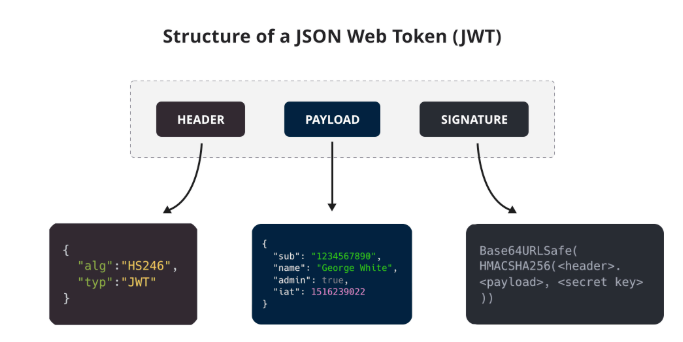
let jwt = require('jwt')

// !!! PAYLOAD REQUIRED

let result = jwt.generateToken(payload) // just data
// or
let result = jwt.generateToken(payload, header) //  need to provide data and header
// or
let result = jwt.generateToken(payload, header, signature) // need to provide data, header and signature
// or
let result = jwt.generateToken(signature, payload) // signature and  data, header is not mandatory here

return result;
Additional
In cases where values are not provided, values are taken
UserActions
Functions:
userActions.refreshUser(UserId): refreshes the given user's data from cache;userActions.hasPermission(permission,userId): checks whether the given permission exists for the given userID;userActions.loadToken(login,password): generates Bearer JWT token through the given login and password;userActions.loadToken(login,password,isAlwaysCheckPassword): in cases where the password has changed,isAlwaysCheckPasswordshould be set to true;userActions.databaseConnection(): databases created by databaseControl can be used through this method:
let db = userActions.databaseConnection({"name":"auth"});
let data = variables.hash_password;

let sql = `update pa_auth_users
            set password = '${data.password}',
                updated_at = now()
            where id = '${data.user_id}'
            and state = 1
            returning id;
            `
let exist = db.queryForMap(sql)
userActions.refreshUser(data.user_id)
return exist